Case study · Administration system
Built the administrative backbone for a B2B learning platform that had outgrown its manual processes.
The student and teacher sides of the platform had been redesigned, and adoption was growing across Dutch vocational schools. The operational side had not changed. Students were getting courses through two parallel order flows, both still being processed by hand. School administrators were ordering stand-alone courses directly from the bookstore. The bookstore was also handling voucher orders, where a school or a student purchased multiple courses at once, sometimes including courses from other LMS providers. Each school could use either kind of order, or both at the same time.
Four roles were keeping the whole operation moving: bookstore purchasers, school administrators, system administrators, and the finance team. Each one carried its own friction, and a single order touched all of them.
The project was to design admin tools for all four roles at once, on top of the existing student-facing platform, so the operation could scale with the customer base.
I worked through the operational problem in three phases, grounded in real behaviour, sharp problem definition, and testing before building. Open any method for the full detail.
Understanding user
Structuring the problem
Testing before building
Bookstore purchasers were fulfilling orders for multiple schools at once. Many packages overlapped between schools, and some were shared entirely, which made wrong-package orders a regular pattern. Training and email reminders had not worked. We built school-based package filtering so purchasers can only see the valid options for the school they have selected. The fix was in the system, not in the training. Wrong-package orders dropped to near zero after launch.
Voucher orders from the bookstore could take days to process and pay, and students were sitting blocked from their courses for that whole time. We built a 14-day grace period: while a voucher order is being processed, students get temporary access to the courses on it, so they can start on time. Temporary access converts automatically to permanent once payment is confirmed, or is revoked if payment fails. The number of "where is my access" support tickets dropped sharply once this shipped.
School administrators order for their own students. They can issue voucher codes for students choosing their own start date, or assign courses directly for groups starting together. Invoice profiles are configured per school and auto-selected when only one exists, bulk ordering is available, and the system flags students who already have an active package to prevent duplicates.
Bookstore orders, school admin orders, and student invoices used to live in three separate views. That was why VAT reporting took six hours every quarter. We built one unified dashboard with all invoice types in it, and a one-click VAT export across all of them. Quarterly VAT now takes around one hour.
At its core, the design work turned complex, manual operations into a system people could run with confidence. The right action became the easy one, and the room for error quietly disappeared.
The student and teacher sides of the platform had been redesigned, and adoption was growing across Dutch vocational schools. The operational side had not changed. Students were getting courses through two parallel order flows, both still being processed by hand. School administrators were ordering stand-alone courses directly from the bookstore. The bookstore was also handling voucher orders, where a school or a student purchased multiple courses at once, sometimes including courses from other LMS providers. Each school could use either kind of order, or both at the same time.
Four roles were keeping the whole operation moving: bookstore purchasers, school administrators, system administrators, and the finance team. Each one carried its own friction, and a single order touched all of them.
The project was to design admin tools for all four roles at once, on top of the existing student-facing platform, so the operation could scale with the customer base.
I started with two weeks of passive observation, sitting with system administrators while they worked. People are unreliable narrators of their own workflows: ask how someone processes an order and you get the happy path, not the three spreadsheets they cross-reference.
A few patterns came out of those two weeks:
The third pattern mattered most. It would not have come up in interviews, because bookstore staff did not think of incorrect orders as a recurring problem.
Order-to-access was the longest flow in the operation, and no single person had full visibility of it. Mapping it with the team showed a problem the interviews had not: voucher orders could take days to be processed and paid, and students sat blocked from their courses for that whole window.
After observation, I interviewed people in each role, coming in with specific questions about what I had already seen. Targeted interviews showed the friction around those behaviours, where generic ones would have produced the happy path again.
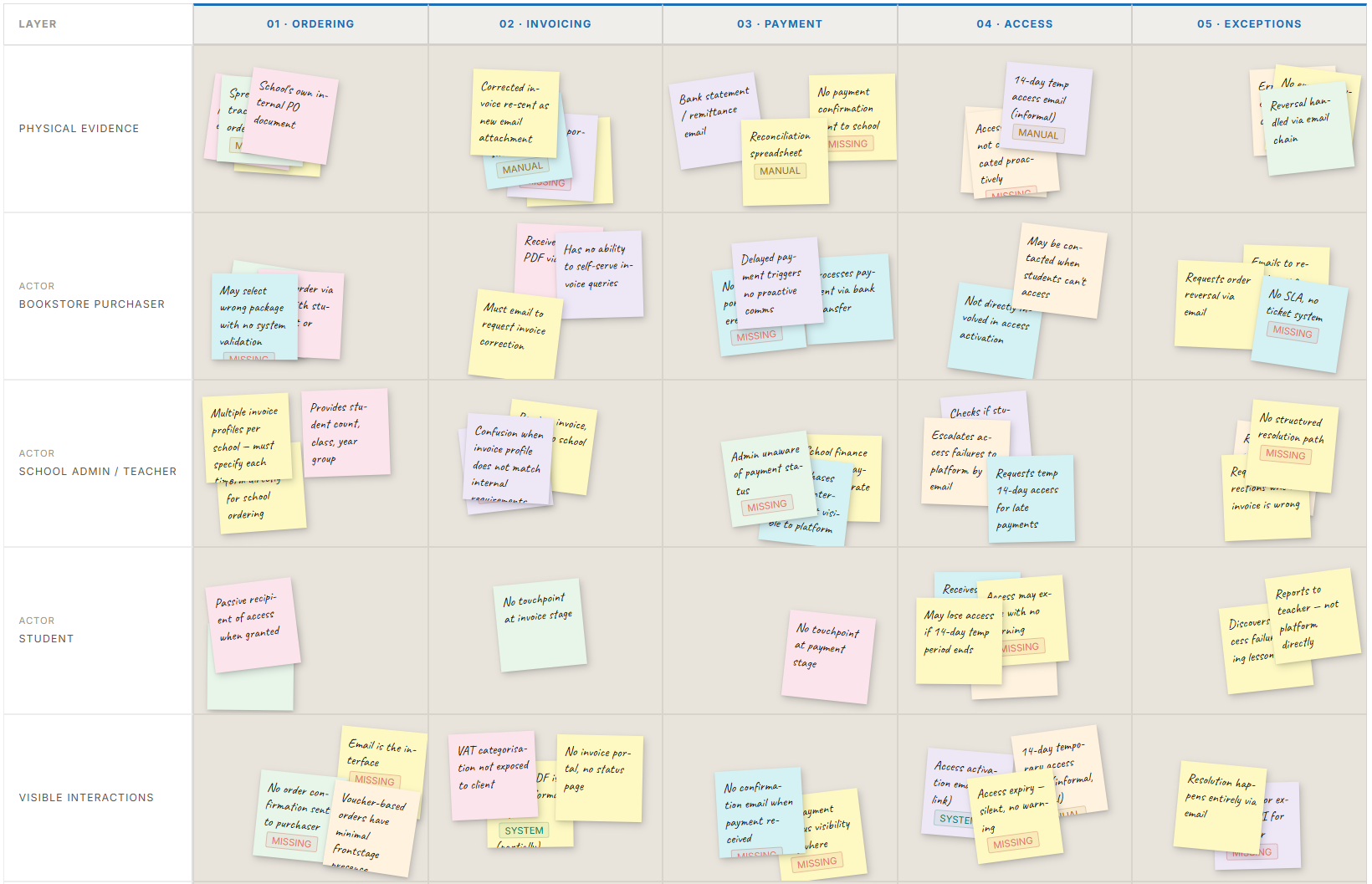
With the patterns from observation in hand, I synthesised them with affinity mapping. They were not separate problems but symptoms of one structural issue: the platform was built for a student ordering for themselves, and never extended to the schools, cohorts, and partners that grew around it.
Three primary personas shaped every decision from here, because the team kept designing as if all admin users were the same person.
"Just show me the right options. I don't have time to cross-check against a spec sheet."
"If I have to read a manual to use it, I won't use it."
"I just need to know what to type, and what happens if I get it wrong."
Jobs to be Done reframed each need as intent. The bookstore purchaser's job is not "to place an order" but "to get the right materials to the right students without being blamed." That shaped the package-filtering decision: make the wrong choice impossible, not just harder. The biggest tensions became How Might We questions:
help bookstore purchasers always select the correct package, without relying on email instructions?
allow school admins to order for students with different start times, without splitting the flow?
let students correct invoice details themselves, without submitting a support request?
Two structural questions had to be settled before any wireframing.
A separate admin app felt clean, but many smaller schools have no dedicated administrator: the same person teaches, orders the materials, and sometimes orders as a student. Two logins would break that workflow, so we extended the existing platform with a view per role.
Off-the-shelf tools could not handle the role-aware filtering, cohort-linked packages, multi-rate VAT, and the per-package remuneration each partner author needed. We built custom.
We prioritised the work with the developers using MoSCoW. The Won't Have list mattered most: it gave the team permission to ship a solid core over a complete one, which is hard to hold to when six stakeholder groups each have a decade of unaddressed needs.
Each role gets its own account, except in small schools where purchasing attaches to a teacher account. I mapped each flow step by step, designing certain errors to be structurally impossible rather than just less likely.
Wrong packages are not selectable. A system administrator sets each school's valid packages once; the purchaser picks a school and sees only those. The fix was structural, not instructional. Purchasers add their own order and invoice details, then invoice in bulk or individually, and voucher codes generate on completion.
Two ordering methods: voucher codes for students choosing their own start date, or direct assignment for groups starting together. Invoice profiles are configured per school and auto-selected when only one exists. Bulk ordering is available, and the system flags students who already have an active package to prevent duplicates.
My Courses shows a persistent banner with the access end date during temporary access, a fix that came straight from prototype testing. Invoice Request is a three-step flow that confirms the dates and explains what happens at day 14, and Payment Status shows the invoice state at any time.
One dashboard holds every invoice across all schools and order types, filterable by school, date, payment status, and type. Marking an invoice paid activates student access automatically, and one-click VAT export handles quarterly declarations. Unpaid student orders expire after 30 days with an automatic credit invoice, keeping the view clean.
On a greenfield project, the order of work is itself a design decision. The sequence below was deliberate.
With no live product, I ran task-based prototype testing with five participants across the roles, each working through the Figma prototype while thinking aloud.
"The bookstore purchaser described a significant drop in back-and-forth emails with the Learning management system team. The school administrator called the automated invoicing the change she did not know she needed."
post-launch follow-up interviews with two original research participantsThe temporary access system tested cleanly. Five participants, no edge cases appeared. Two enrolment periods later, students were repeatedly requesting the 14-day grace period across school years. Scale revealed a pattern that controlled testing structurally could not. We fixed it post-launch with a once-per-year cap.
The MoSCoW session produced more must-haves than the timeline could support. I had to push back and reframe the conversation around what a broken first version would cost versus what a working core would unlock. The Won't Have list became the most important output of that session.
I started with two weeks of passive observation, sitting with system administrators while they worked. People are unreliable narrators of their own workflows: ask how someone processes an order and you get the happy path, not the three spreadsheets they cross-reference.
A few patterns came out of those two weeks:
The third pattern mattered most. It would not have come up in interviews, because bookstore staff did not think of incorrect orders as a recurring problem.
After observation, I interviewed people in each role, coming in with specific questions about what I had already seen. Targeted interviews showed the friction around those behaviours, where generic ones would have produced the happy path again.
Order-to-access was the longest flow in the operation, and no single person had full visibility of it. Mapping it with the team showed a problem the interviews had not: voucher orders could take days to be processed and paid, and students sat blocked from their courses for that whole window.

I synthesised the observation patterns with affinity mapping. They were not separate problems but symptoms of one structural issue: the platform had been built for a student ordering for themselves, and was never extended to the schools, cohorts, and partners that grew around it.
Jobs to be Done reframed each need as intent. The bookstore purchaser's job is not "to place an order" but "to get the right materials to the right students without being blamed." That shaped the package-filtering decision: make the wrong choice impossible, not just harder.
I mapped each flow step by step, including where it could go wrong and how the design would prevent it, so certain errors became structurally impossible rather than just less likely.
Two questions came first. We extended the existing platform with a view per role rather than building a separate admin app, because many small schools have one person who teaches, orders, and sometimes orders as a student. And we built custom rather than off-the-shelf, because the role-aware filtering, cohort-linked packages, multi-rate VAT, and per-package author remuneration were too specific. We prioritised with MoSCoW, where the Won't Have list mattered most.
I tested the concept with two school administrators and one bookstore purchaser before any UI. The easiest step to skip under time pressure, and almost always the one that saves the most time later.
Navigation labels were tested as plain text cards, before any visual design, so nothing had to be relabelled and retested later.
With no live product, I ran task-based prototype testing with five participants across the roles, each working through a Figma prototype that covered all four workflows end to end. Two changes came directly from it: